
System Components
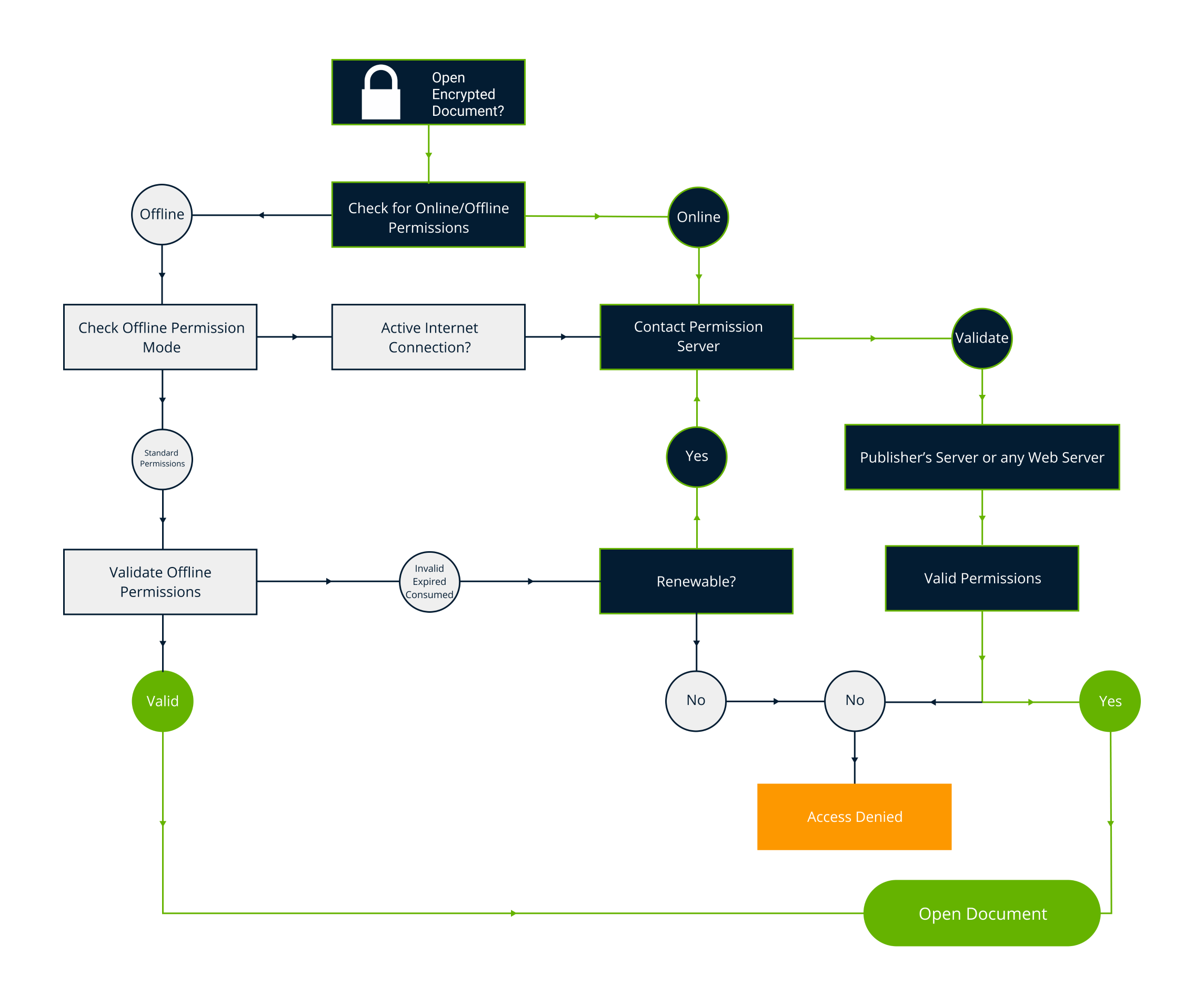
FileOpen's DRM solution operates as a control layer within industry standard formats and applications. The system includes tools to encrypt documents, client-side decryption software that runs inside the most common viewer applications, and server software that uses a published control protocol that can also be implemented in your own solution.

Document Encryption
FileOpen uses industry standard encryption via the methods defined in the appropriate format specification. For PDF this means AES-256 for PDF (ISO 32000) 2.0 compatibility and RC4-128 for backward compatibility to earlier versions of PDF. For MSOffice files we use AES as implemented by Microsoft via the add-in API layer.

Access Controls
Documents encrypted with FileOpen can be opened only when, where and how the publisher's PermissionServer allows. Access may be granted with any combination of permissions to print, edit, copy, annotate, sign, save changes and other controls.

Authentication
User identification is controlled by the licensee and does not require any identity to be issued or maintained by FileOpen. Identities may be instance-specific, governed by external systems like LDAP/AD or integrated into SSO solutions via SAML/Shibboleth.
Watermarking
Unlike systems that stamp watermarks onto documents prior to delivery, the FileOpen solution creates and imposes watermarks when documents are displayed. So multiple users can open the same document with unique watermarks and each user's watermarks are new each time the document is opened.

Annotations
PDFs encrypted with FileOpen can be annotated within Adobe Acrobat/Reader and other supported PDF viewers, and because FileOpen properly implements the PDF standard, these annotations can be maintained and modified across viewers including mobile applications and unmodified browsers.

User Experience
FileOpen enables seamless and invisible control within standard document viewing environments, like Adobe Acrobat/Reader, MSOffice and all modern browsers. Users with access can open documents without any extra steps, but users without access simply cannot. The system is designed to be invisible where possible.

For Developers
Like PDF and the Web, FileOpen implements an architecture that includes an open protocol so that implementors can create and manage their own server logic on their own systems. For those who don't want to develop server code, FileOpen and our partners also operate cloud solutions that can be accessed and controlled via REST and other standard interfaces.